Offline Dragon Alternatives for Mac You Can Buy Once

The short answer: offline Mac dictation you can buy once
Yes—there are pay-once options for local Mac dictation. For replacing Dragon’s speech-to-text role, consider the following shortlist. Choose around where you want the text to land, your Mac’s hardware, and whether you want a lifetime license rather than a recurring plan.
Press our hotkey, speak, and text lands at the cursor in your current desktop app. We require macOS Sonoma 14+ and at least 4 GB RAM; Intel Macs are supported, with Apple Silicon recommended. Consider us for cross-app voice drafting.
VoiceInk is another local/offline Mac option without a subscription. The New York Times’ Wirecutter reports a $25 one-time purchase for offline dictation on iPhones and newer M-series Macs. It belongs on your shortlist if you use Apple Silicon and prioritize a low upfront cost.
Superwhisper runs entirely on your Mac when using its local Whisper models, without transmitting audio. Sprecho.ai reported in October 2026 that it offered a US$249.99 lifetime option alongside monthly and annual subscriptions. For this requirement, the relevant combination is the lifetime option with local models.
SpeakMac also merits consideration: aidictation.com described it in March 2026 as a practical Dragon alternative for Mac users seeking local dictation and a simple one-time purchase model.
Whisper Notes is available on Mac and iPhone, with offline transcription running locally on Apple Silicon. Speakwiseapp.com reports a $6.99 one-time purchase. Consider it if local transcription is your main requirement.
Leave cloud-dependent options off a strictly offline shortlist: Wispr Flow needs internet access to recognize speech; Microsoft Word Dictate has no offline dictation model on any platform; and Mobius Scribe is primarily cloud-assisted, not fully offline.
Is Dragon still an option on Mac?
Dragon Professional v16 is a Windows product, optimized for Windows 11 and backward-compatible with Windows 10. That makes it a different purchasing proposition from a native Mac dictation app. If your requirement is to speak directly into your everyday Mac workflow, treat that platform distinction as the starting point—not as a minor detail to resolve after choosing a license.
How it is sold and priced: Dragon Professional has a vendor-contact purchasing route, with no listed price. For a pay-once shortlist, do not assume either a particular upfront cost or a subscription model from that sales route alone. A contact-based offer and an explicitly priced lifetime license are different kinds of buying information.
For organizations, Dragon Professional also offers volume licensing with the Nuance Management Center. That combination enables deployment, management, and sharing of custom words, commands, and auto-texts across users. Those are relevant capabilities if you are choosing software for a team rather than simply replacing your own typing. They should not, however, be treated as evidence of Mac compatibility or of an individual license’s price.
If you are coming from Dragon, separate what you want to keep from the product name. Is your essential task turning speech into prose, or does your workflow depend on shared vocabulary, commands, and reusable text? Use that distinction to frame your comparison: a tool suited to drafting paragraphs may not be the right replacement for a command-heavy workflow.
For this article’s narrower requirement, keep three questions separate: does the candidate run on your Mac, can its transcription work offline, and is the license explicitly sold as a one-time purchase? Meeting one condition does not establish the other two.
What to look for in an offline Dragon replacement
Use the same practical test for every candidate: can it handle your everyday writing in the way you want to work? Treat offline processing, ownership cost, and correction effort as separate criteria rather than letting one attractive feature decide the purchase.
Keep the transcription on-device. On-device transcription keeps recordings out of the cloud. For a strictly offline workflow, make local processing a requirement for the transcription you intend to use—not merely a preference. Judge the workflow you will actually run, rather than choosing on the strength of the word “offline” alone.
Compare total cost, not just the purchase price. One-time licenses trade a larger initial payment for no recurring dictation bill. Their value depends on how long you expect to use the app and which features you need. Compare free built-in options, subscriptions, and desktop licenses against your actual workflow; avoid paying for scope you will not use.
Test a real writing task. Start with a low-risk draft you can easily compare with your current method. Choose something representative, such as an issue description, review comment, or documentation paragraph. Include correction and review time in the comparison, rather than judging only how quickly spoken words become text.
Evaluate your own speech and vocabulary. Recognition varies with voice, microphone, language, model, and vocabulary. Include names, numbers, homophones, and specialist terms in your test, then review those carefully. A supported language or a larger model does not guarantee equal accuracy for your speech.
Test command-dependent work separately. If your tasks require navigation, command grammars, or structured code editing, look for a code-aware voice-control system. Make those requirements explicit in your trial instead of treating successful prose dictation as proof that the same tool will handle structured editing.
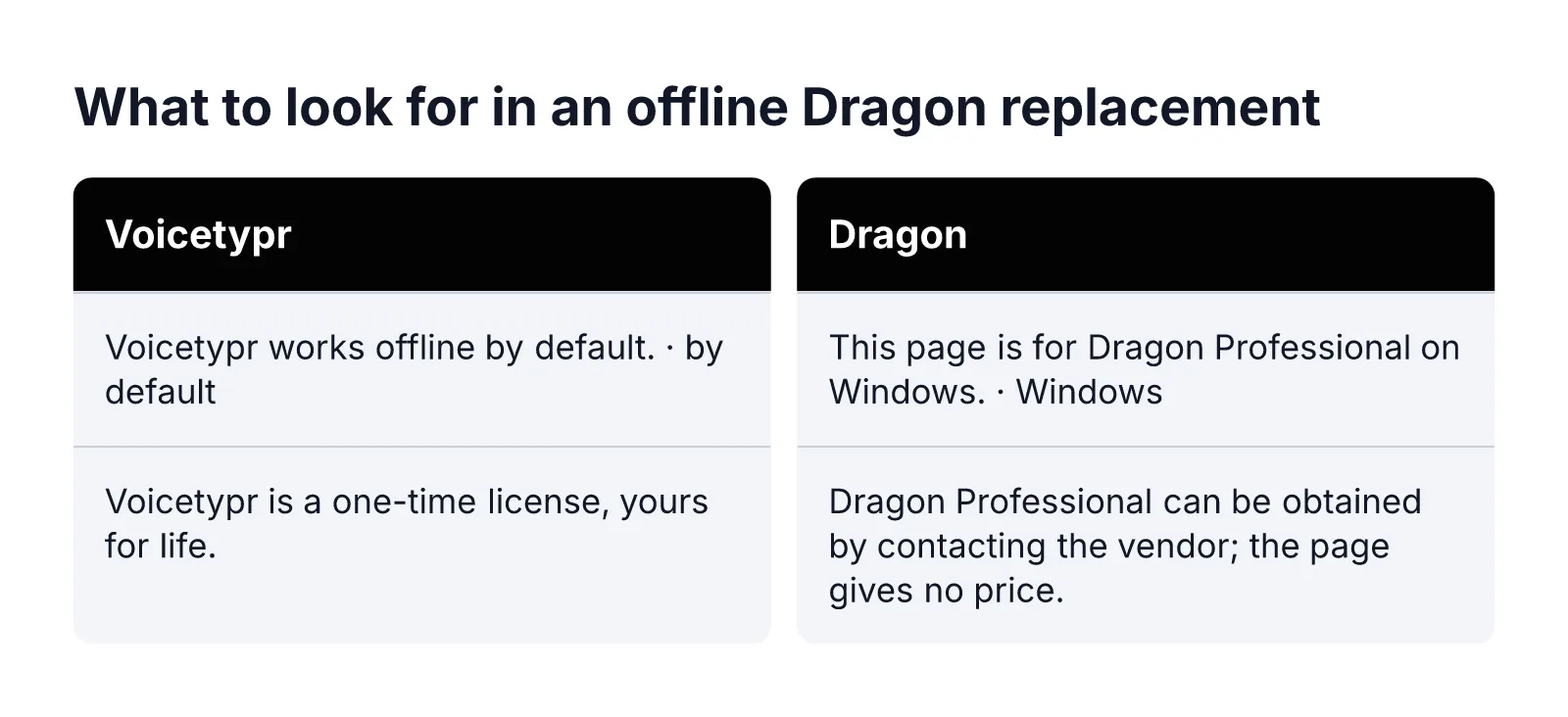
Voicetypr · Dragon
Voicetypr: offline by default, one-time license
Our default speech-recognition engines are on-device Whisper and Parakeet models. After the required model setup, we can transcribe without an internet connection, processing speech on your machine rather than uploading audio to the cloud. This makes our local workflow a fit if your priority is offline prose dictation rather than a cloud transcription service.
Offline transcription is distinct from an entirely disconnected lifecycle. Our licensing, model downloads, and updates have separate network dependencies. Optional cloud speech and AI formatting are separate workflows: when you enable them, they may send audio or text respectively. For an offline trial, use downloaded local models and leave those optional workflows out of your test.
Price and ownership: our one-time licenses start at $39, with a $69 option covering two devices. You can choose one, two, or four activations when buying. The license is yours for life, with no recurring fees, and purchases include access to software updates we release for the product. Choose the activation count around the computers you intend to use, rather than treating the starting price as the two-device price.
Our free three-day trial needs no card and includes full access to all features. Individual purchases carry a seven-day money-back guarantee from the purchase date. Use the trial to complete model setup and try a disconnected writing session before deciding whether to buy.
Best fit: we recommend our app for prose such as prompts, issue notes, review comments, and documentation. We do not provide code-aware navigation, command grammars, refactoring, or verified IDE integrations, and we do not reproduce Google Docs voice-editing commands. If those are central to your Dragon workflow, assess them separately from the quality of a dictated paragraph.
MacWhisper: better for recordings than inline dictation
MacWhisper is worth considering when your starting point is recorded audio rather than a text cursor. Sprecho.ai reported in October 2026 that it transcribes audio files locally using Whisper. That makes it a candidate for the offline-transcription side of this shortlist, especially if you want to turn existing recordings into text rather than mainly dictate while writing.
One-time pricing: Sprecho.ai reported a €59 one-time price in October 2026; lumevoice.com separately reported €65 one-time. Both describe a pay-once purchase, but the reported amounts differ. Treat those figures as attributed price reports, not a single current checkout price. For your shortlist, the useful distinction is the reported one-time purchase model rather than a recurring subscription.
Does it dictate into any app? In Sprecho.ai’s October 2026 account, system-wide dictation is a secondary, basic feature in the Gumroad version and is absent from the App Store version. Do not treat those editions as interchangeable for a Dragon-style inline workflow. If cross-app dictation is your main reason to buy, that edition distinction matters more than its ability to transcribe an audio file locally.
Who it suits: aidictation.com argued in March 2026 that MacWhisper is not the strongest direct Dragon replacement for inline dictation, but is better suited when meetings, voice memos, and imported audio are part of the workflow. It recommended MacWhisper when recordings and imported audio matter as much as live dictation. Our recommendation is to consider it for that mixed workload, rather than choose it primarily as a cursor-first typing replacement.
The practical dividing line is where your work begins: with audio you already have, or with words you want to enter into another app right now. Put MacWhisper higher on your personal shortlist for the former, not automatically for the latter.
macOS built-in Dictation: the free baseline
Apple Dictation deserves a place in this comparison even though it is not a license you buy. In March 2026, aidictation.com described it as built into the Mac and requiring no purchase. For a reader avoiding subscriptions, that makes it a useful starting point: decide whether the included option meets your needs before choosing a paid replacement.
Offline capability depends on the configuration. Sprecho.ai reported in October 2026 that Apple Dictation runs on-device on Apple Silicon for supported languages, and that audio goes to Apple’s servers where on-device processing is unavailable. The important distinction is therefore not simply whether you own a Mac: the reported offline capability has both hardware and language conditions. Do not read “built in” as meaning every dictation session stays local.
Lumevoice.com describes the boundary in practical terms: processing happens on the device for the languages listed in Keyboard settings; otherwise, it uses Apple’s servers. For an offline-only workflow, use that language-specific indication to distinguish a suitable configuration from one that relies on server processing.
Best fit: occasional, quick dictation. The New York Times’ Wirecutter describes Apple Dictation as showing text while you speak, recognizing punctuation commands, and recognizing text offline. It recommends the built-in tool for occasional, quick dictation. That is a sensible role for it here: an included way to enter short passages, rather than an automatic reason to purchase a separate app.
A relevant limit for Dragon users: Sprecho.ai reported in October 2026 that standard Dictation has no custom vocabulary. If adding specialist words is central to your workflow, weigh that limitation explicitly. Our recommendation is to keep Apple Dictation on the shortlist when brief text entry and no purchase matter most, provided your configuration meets your offline requirement.
How to choose if you’re coming from Dragon
Choose around the part of your Dragon workflow you actually want to preserve. Rather than naming one overall winner, make a short list of must-haves and use it to eliminate unsuitable choices. A useful final decision should identify both your preferred tool and the tasks you will still handle another way.
- For a live-writing workload, prioritize the destination. Put our app on your shortlist when local raw transcription, a consistent desktop hotkey, and a one-time license are your requirements. Decide whether entering prose is enough before considering additional capabilities.
- For a mixed audio workload, weight recordings explicitly. In March 2026, aidictation.com recommended MacWhisper when recordings and imported audio matter as much as live dictation. Make that distinction a purchasing criterion, not an afterthought.
- For a budget-led choice, require a reason to buy. Aidictation.com recommended Apple Dictation as a free Mac fallback in March 2026. Write down what a paid option must improve for you before spending.
- For command-heavy work, create a separate requirement. If navigation, command grammars, or structured code editing are essential, evaluate a code-aware voice-control system rather than selecting solely for prose entry.
For privacy-sensitive work, map the whole text journey. In our app, optional cloud speech can send audio, optional formatting can send text, and remote or LAN modes add another system. Local history can retain text, while the destination app receives what we paste. Decide which of those data flows are acceptable for your task; local speech recognition is only one part of that decision.
Finish with a simple decision note: “I need this for ___; my non-negotiable requirement is ___; I will handle ___ separately.” For task-specific starting points, explore our voice typing use cases. Choose the option that fits that statement—not the one with the longest feature list.
Leave a Reply